

Before stepping into the discussion of the Zerodha Margin Calculator, let’s get acquainted with the concept of “Margin” in the trading field. Let’s assume that a trader is engaged in the stock market and doesn’t have enough funds to initiate a trade. Here, in this situation, he can get a loan from his brokerage firm to purchase securities. You can call it buying on margin. For obvious reasons, borrowing money isn’t without its costs. The charge is not static, brokerage firms fix the rate according to their demand. The slabs of margins are different as per the security.
FAQ
You can calculate the Zerodha margin by yourself through their margin calculator. This calculator helps to figure out the exposure that Zerodha gives for different segments like intraday, delivery, Fu0026O, currency, and commodity. Just go to the margin calculator, select your preferable segment, and put the quantity and price and it will show you the margin.
Yes, the Zerodha margin calculator is free for Zerodha Kite users. If you have an account with Zerodha, you can easily access the Zerodha margin calculator. There you can see each and every script and its margin.
In Intraday, you can get up to 20x margin from Zerodha. The margin calculation process is the same. First, go to the margin calculator then choose the intraday segment. And then select share name, quantity, and buy-sell price, and the calculator will show you the margin.
What is Margin in Trading?
If we simplify the concept, Margin is the difference between an investor’s holding amount value and the loan amount from a broker. Margin trading is the act of borrowing money to buy securities, often known as buying on margin. Here, the trader or buyer has to pay a certain percentage of an asset’s value and borrows the rest from the broker. The broker plays a lender’s role here. After squaring off the position, the margin can be settled.
Features of Margin
In order to clarify the margin trading properly, here we’ve tried to list some of the features:
- The margin payment and repayment duration vary for different stock brokers.
- In case of converting any shares from intraday to delivery, you need to have that amount in your account. Margin used in intraday can’t be added to the delivery.
- As I have mentioned above margin calculation differs according to the security type. Like in Zerodha, in the equity section traders can get a maximum of 15 times, commodity 70 times, and F&O 33 times. (Margin amount can be changed as per the market demand)
Zerodha Margin Calculator
It can be assumed that the concept of margin is clear now. So, in continuation of the previous discussion, we can move into the main topic of Zerodha Margin Calculator.
How to Use Zerodha Margin Calculator?
To use the Zerodha margin calculator, you need to have an account with Zerodha. However, here is the link to use Zerodha Margin Calculator.

Equity Margin Calculator
Depending on the stocks and order type, the equity margin may differ. In Zerodha traders can get intraday leverage in normal MIS and BO & CO orders.
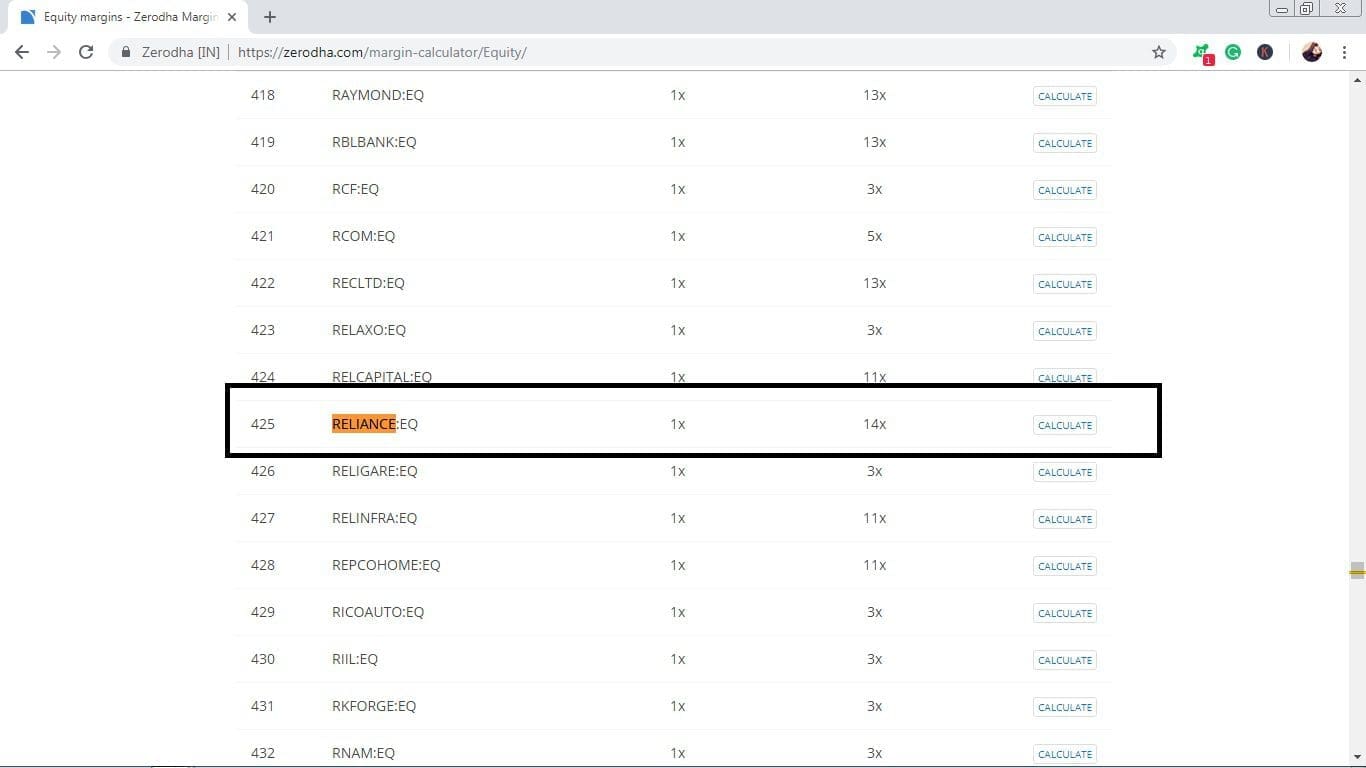
As of the current update, the above table displays margins as per the individual stock. Here, you need to remember that MIS and BO-CO orders carry different margins.






For example, I choose a stock Reliance on both MIS and BO-CO, and the margin outcome is different.
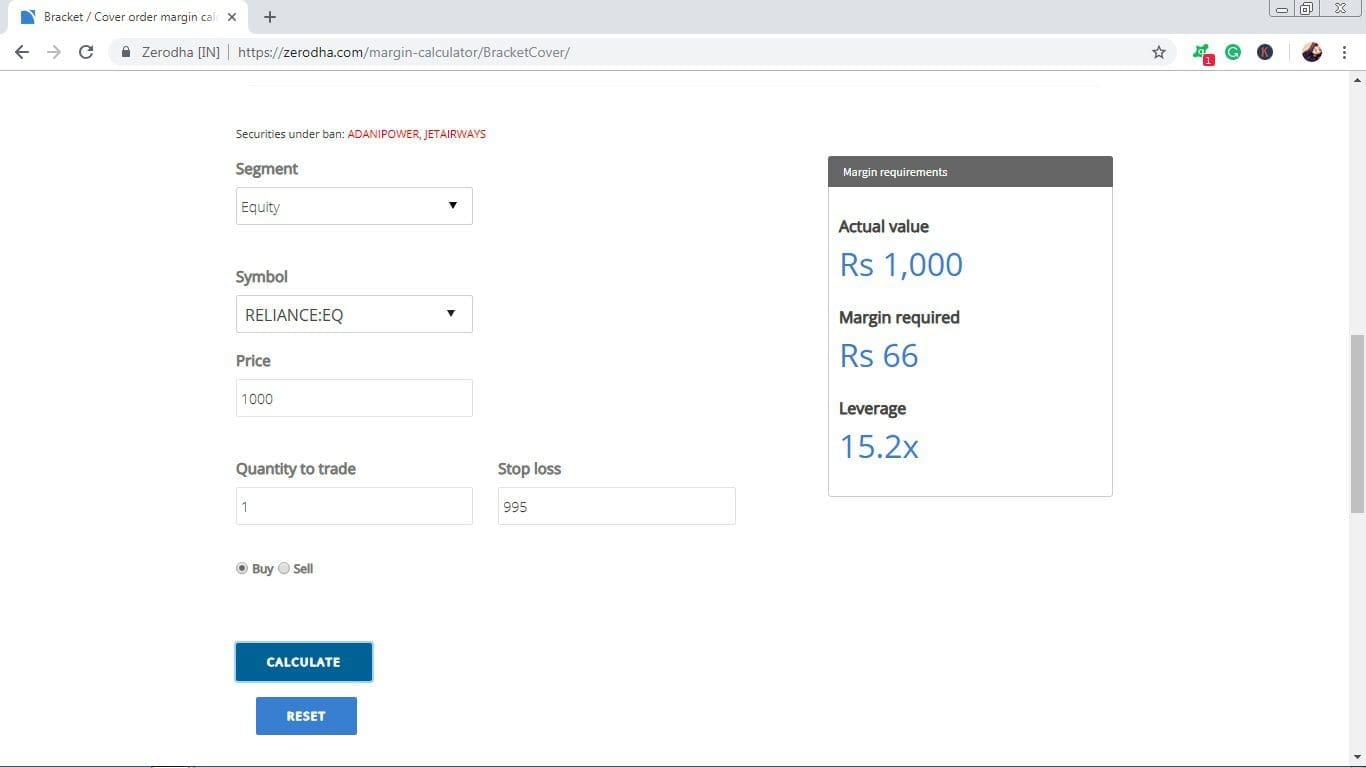
As you can see that in MIS you’ve got 14x leverage whereas in Bo & Co there is a 15x margin.
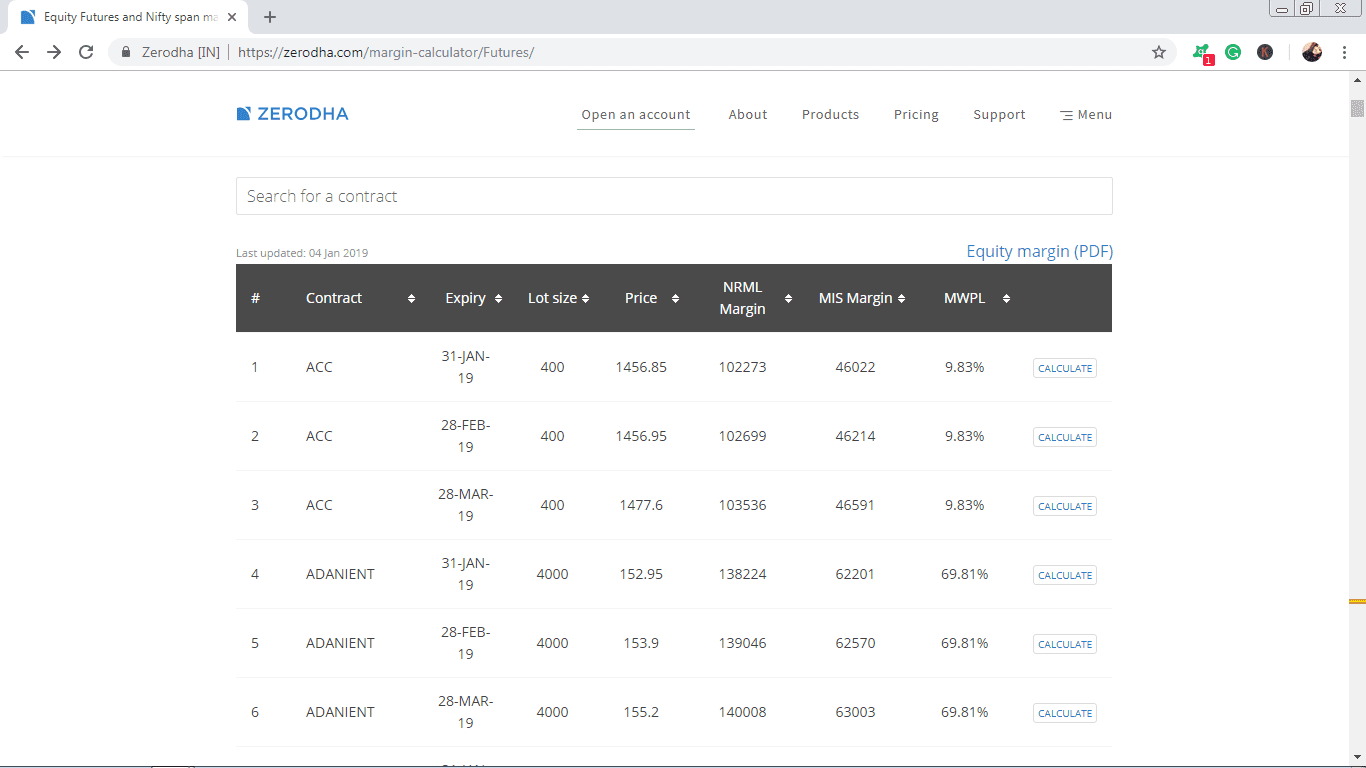
This is the equity futures, here you can see, on the right side of the list, there is a calculated option with each stock. By using the calculated option, traders can analyze the price. The chart displays the contract name, expiry date, lot size, price, the margin in NRML, MIS, and MWPL.
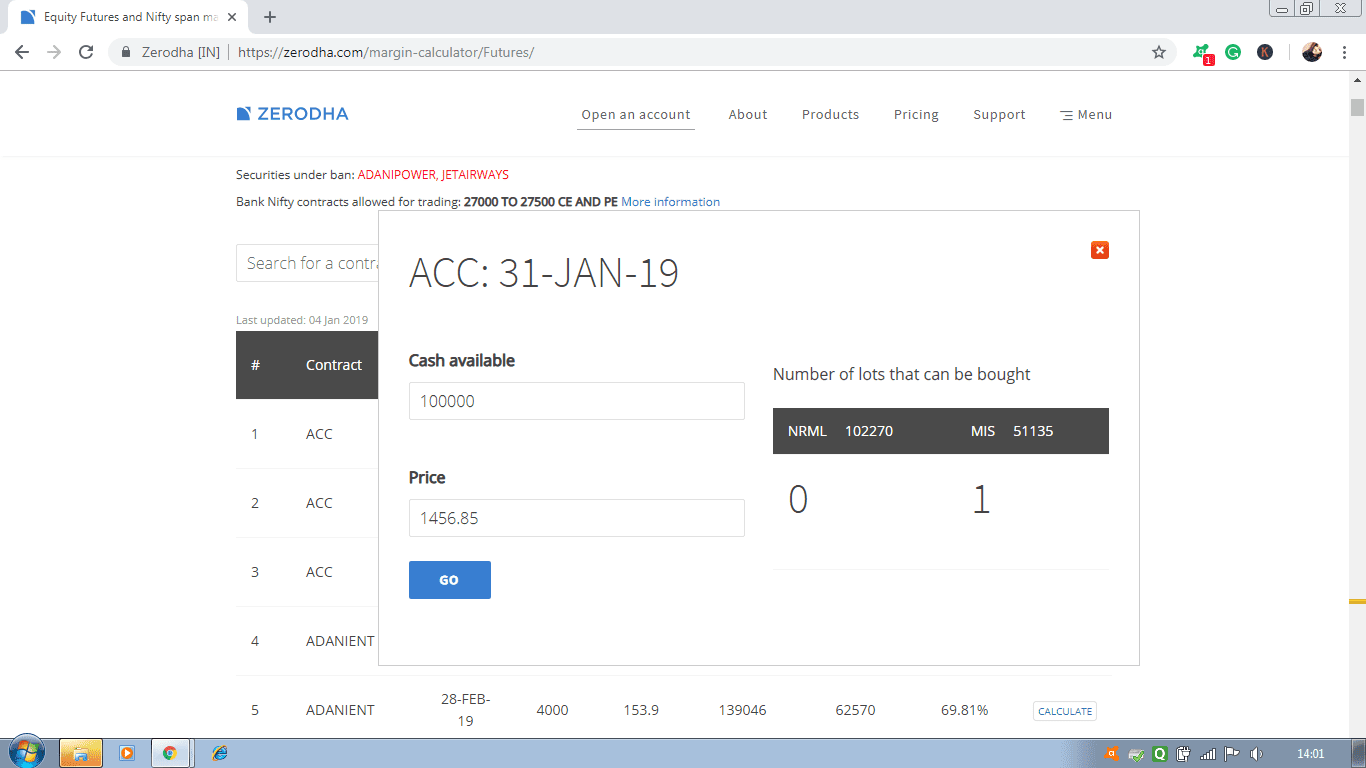
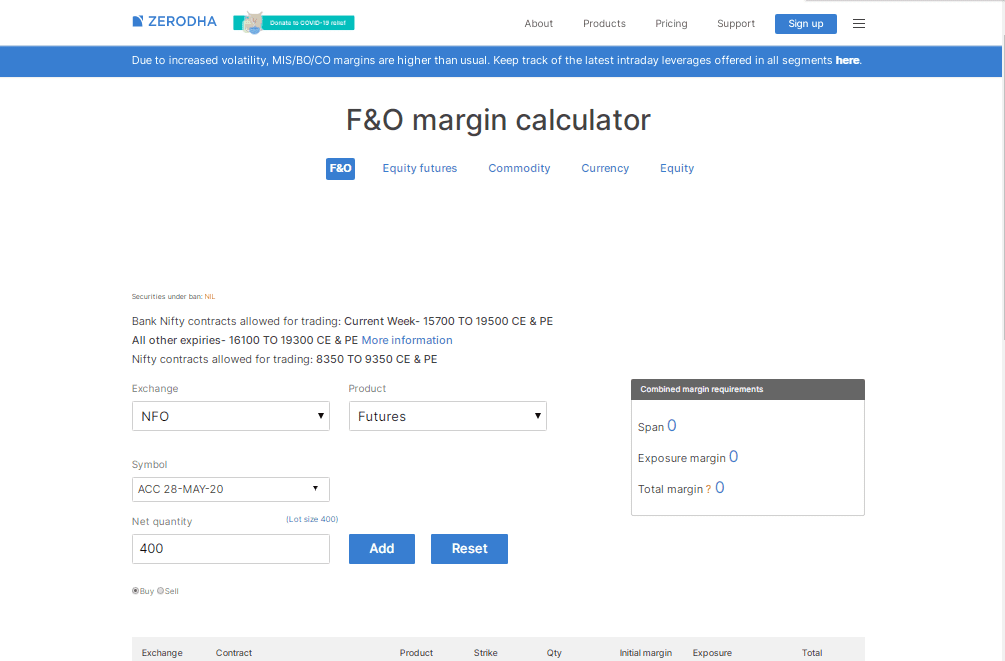
For example, I choose the ACC contract of Jan and make the calculation.
Futures and Options Margin Calculator
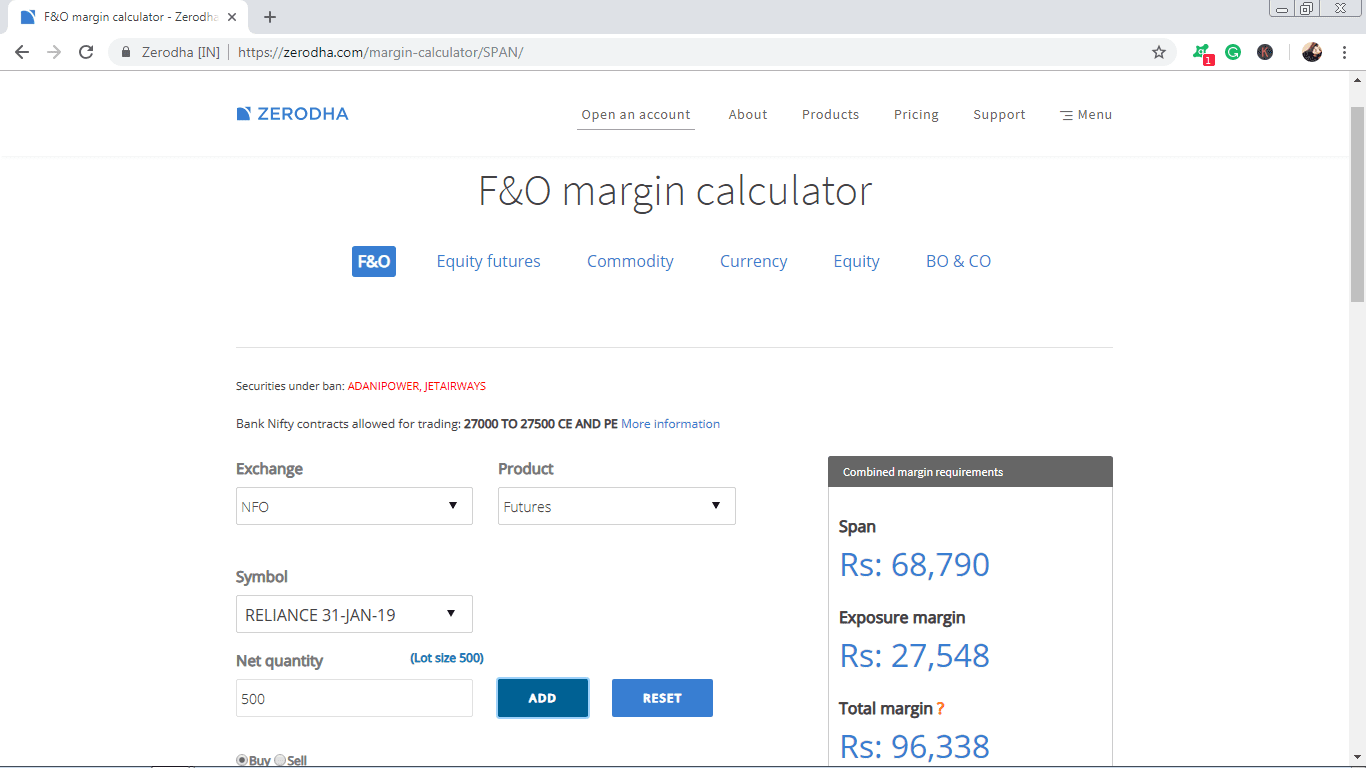
As the picture displays that there are a span, exposure margin, and total margin. Hence, the total margin means the span or initial + exposure.
If you hold a position overnight, you can call it the NRML margin at Zerodha. If traders use the product type MIS instead of NRML while placing an order, they can get additional leverage only for intraday trades.
However, other options include commodity margin, currency margin, etc.
Commodity Margin Calculator
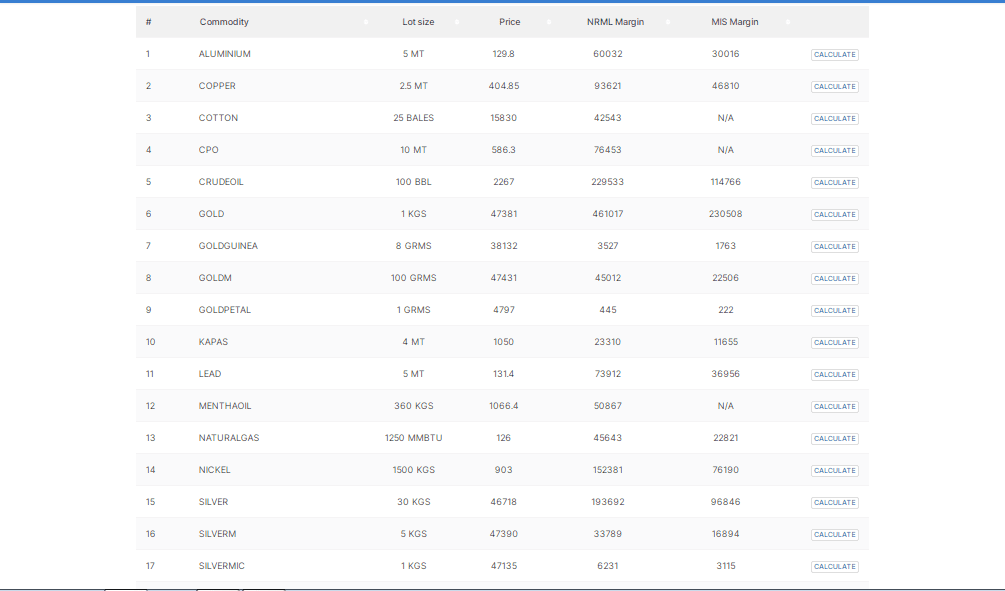
The list below shows the commodity margins of Zerodha as per the latest record. As you can see in the list for NRML and MIS the margin range is different. And as per the lot size also the margin differs.
Currency Margin Calculator
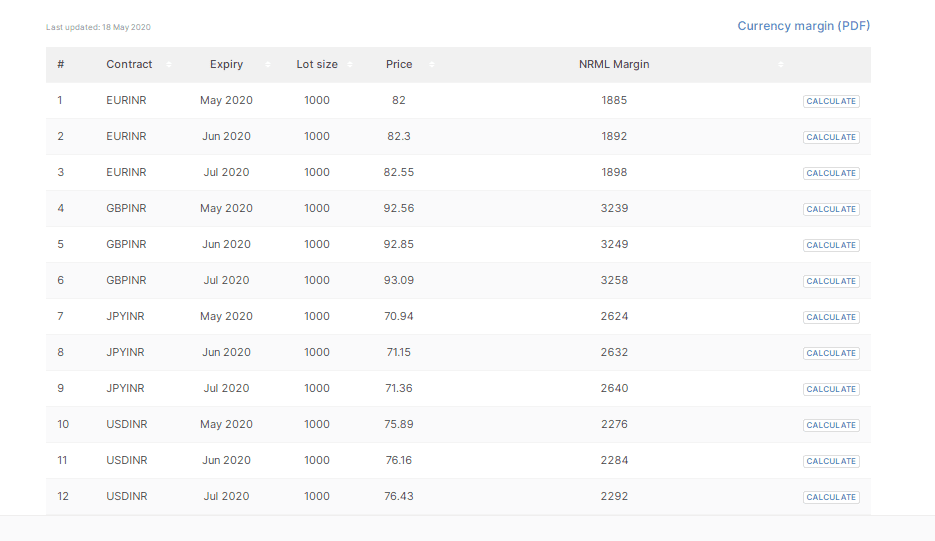
For Intraday currency future margin by Zerodha, you can get it up to 40% margin. It depends on the stock you’re working with. And also its market value. The currency margin chart is given below.
Points to Remember Regarding Zerodha Margin Calculator
- You need to remember that Margin policies may change quite frequently. It depends upon the market momentum and the impact of the share market.
- Here, you need to set the margin amount in a particular time period. And it depends on the trading segment you are dealing with.
- The funds you get on selling some stocks will be credited to your account on T+2 day. And this may also sometimes vary depending on the trading segment.
- Bracket or cover orders sometimes offer higher margins compared to other trades.
SEBI’s New Margin Rule
SEBI’s new margin rules, which come into effect on 1st September 2021, require that at least 10% additional margins be collected on all short-term open positions. The additional margin to be collected will vary depending on the strategic risks of market conditions or client categories and may range from 0–15%. Additionally, SEBI has mandated exchanges to collect 5% upfront margins for long-term/overnight open positions.
After this new margin rule came into existence, all the brokers who were offering more margins on options selling, like Astha Trade, Alice Blue, etc, are now forced to offer the same margin as Zerodha. So the chances of scams or frauds in the name of more margin have reduced.
Conclusion
I hope from the post, you get some clear ideas on how to use the Zerodha margin calculator. Overall, Zerodha provides more margin in comparison to other regular brokers. If you face any difficulties using the margin calculator, you may write comments on it, we will try to help you further. However, Zerodha Margin Calculator is quite easy to use. And it clearly shows all the values and margins for every sector. This calculator helps a trader to maintain the stability of their account.



This was so informative. Not.
Thank you 🙂