
Zerodha Kite is a well-known trading platform that provides a range of features for Indian retail traders and investors to access different financial markets and instruments. Maintaining account security is essential, and changing your Zerodha Kite password periodically is a crucial aspect of it. The biggest issue that is faced by new users in Zerodha is the Zerodha kite password change issue.
As an authorized marketing partner of Zerodha, we face this issue every now and then. One thing to remember once you apply for an account in Zerodha it takes generally 24-48 hours to generate your ZPin after your form verification is complete. Once the ZPin is created you will receive the same in the mail, or mobile. Here are some common FAQs on the topic.
FAQs on Zerodha Kite Password Change
First, log in to Kite and click on the user ID in the top right-hand corner of the screen. Now, select ‘My Profile’. After that, click on password and security in the top right-hand corner. And you’ll get the option to enter a new password after you enter your current password.
No, you can’t change your Login ID after your account has been created. And the ID has been only allocated to you. The reason is User IDs have to be created and updated on the exchange. So, when the unique client code is updated on the exchange, it isn’t absolutely possible to change it.
Your Zerodha PIN or ZPIN is your personal identification. It is for placing orders through their Call & Trade desk and also for raising support queries. Zerodha has introduced ZPIN in order to authenticate Clients that only the Genuine Account Holder is calling for any of their Account related specific Queries or Placing any Orders.
Some Basic Information on Zerodha Kite
- The user id and password will be generated within 24-48 hours of the ZPin issue.
- Once you get your user id and password in your mail you can change your password through Kite and start using the Zerodha account.
- Most traders forget their password of Zerodha and we recommend them to use a simple password and 2Fa questions and write them in a secure place.
- If you still forget your password and can’t remember the same you may reset your password with a Zerodha kite password change option on the Kite login page.
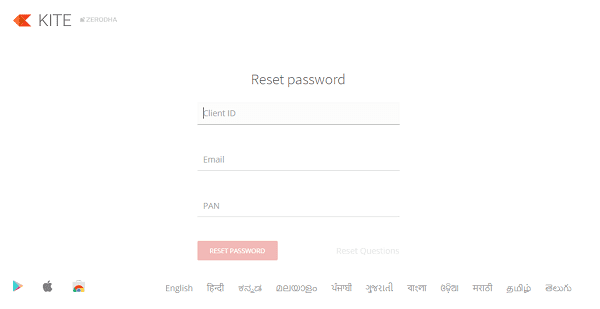
- To undergo Zerodha password change click on the Forgot Password link on the Kite login page at kite.zerodha.com. This will open the Reset Password page.
Zerodha Kite Password Change Issues
If you forget your password
Once you open the page you need to put your Client IP, Email, and PAN number as shown in the image above. Now click on RESET PASSWORD and your new password will be mailed to your registered email id instantly. Remember Gmail and Yahoo email address works well in Zerodha back office whereas Hotmail Mails bounce from the Zerodha online server. So if you are using a Hotmail address you should provide an alternate mail id for Zerodha’s back office. You also should check your spam folder so that you do not miss a single mail from Zerodha
In this way, you can also change your 2Fa answers in Zerodha and we recommend you use simple 2Fa (two-factor authorization) answers such as the letter “a” so that you can easily remember them. But since 2022 this process has changed.





2Fa issues after introducing TOTP
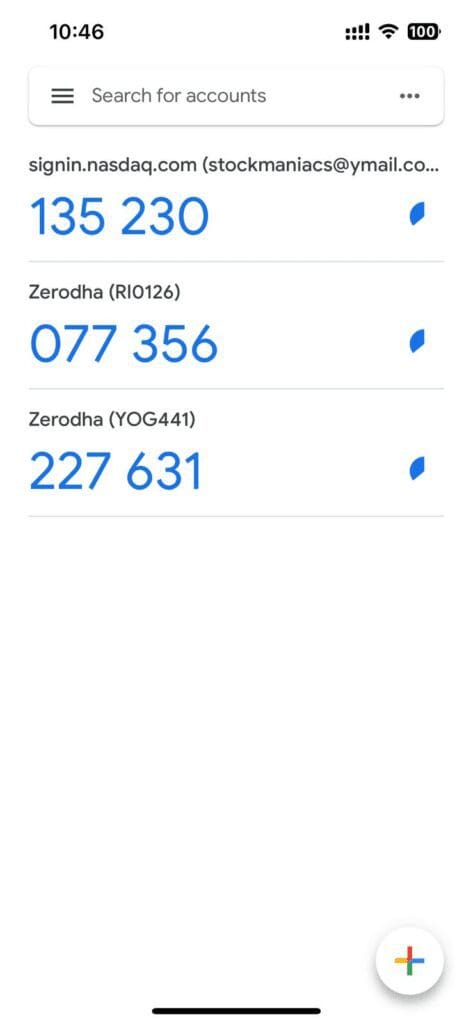
Since 2022 Zerodha has introduced external TOTP as the 2Fa password. For this, you can generate the TOTP in 2 ways.
Using App Code
You can use Kite mobile app code as your 2Fa. You can see this app code in the kite mobile app while you are logging in to Kite on your desktop and require the 2Fa.
Using an External Authenticator like Google Authenticator
You can also use any external authenticator like Google Authenticator to generate the TOTP. This TOTP will change from time to time and you need to put the updated TOTP. You can maintain multiple Zerodha accounts in one authenticator.
Conclusion
In this article, we discussed how to change your Zerodha Kite password and why it is crucial. To change your Zerodha Kite password, log into your account. Then go to ‘My Profile,’ navigate to the ‘Security’ tab, and follow the on-screen instructions. By selecting a strong password with a combination of uppercase and lowercase letters, numbers, and special characters, you can ensure maximum security.
Changing your Zerodha Kite password regularly is necessary to prevent unauthorized access to your trading account, particularly with the increasing prevalence of cyber fraud and hacking. By following this good practice, you can minimize the risk of potential losses.
Zerodha recommends changing your password every 90 days. This is an excellent habit to adopt not only for your Zerodha account but also for other online accounts you may have. These straightforward steps can protect your Zerodha Kite account and avoid any potential losses.
In conclusion, changing your Zerodha Kite password is a simple and necessary step to ensure the security of your trading account. However, still, if you ever face any type of difficulties with the Zerodha Kite password change, you may contact their customer service number. And no technology is 100% free from any uncertain issue. So, if some trouble happens with their Demat platform, they try to solve it within a few times.