
Are you a beginner investor looking to navigate the stock market? If so, then you must have heard of Zerodha, India’s largest stockbroker. Zerodha has been instrumental in changing the face of trading by introducing its innovative platform – Zerodha Kite. In this blog post, we will discuss Zerodha Kite and its user manual, which will help you trade and invest like a pro.
I. Introduction
A. Explanation of Zerodha Kite
Zerodha Kite is a trading platform that allows investors to trade in various financial instruments like stocks, commodities, currencies, and derivatives. It is designed to be user-friendly and customizable to meet individual trading preferences. It is available as a web-based platform, as well as a mobile app.
B. Importance of Zerodha Kite User Manual
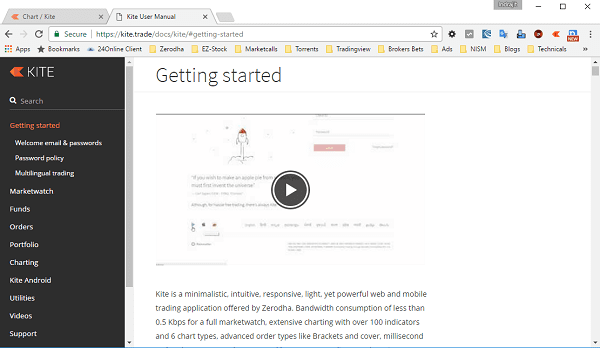
A user manual is essential for any product or platform to be used efficiently. Similarly, the Zerodha Kite user manual provides a detailed explanation of the platform’s features and functions. The user manual is designed to help beginners navigate the platform and trade confidently.
Where to locate the Zerodha Kite user manual?
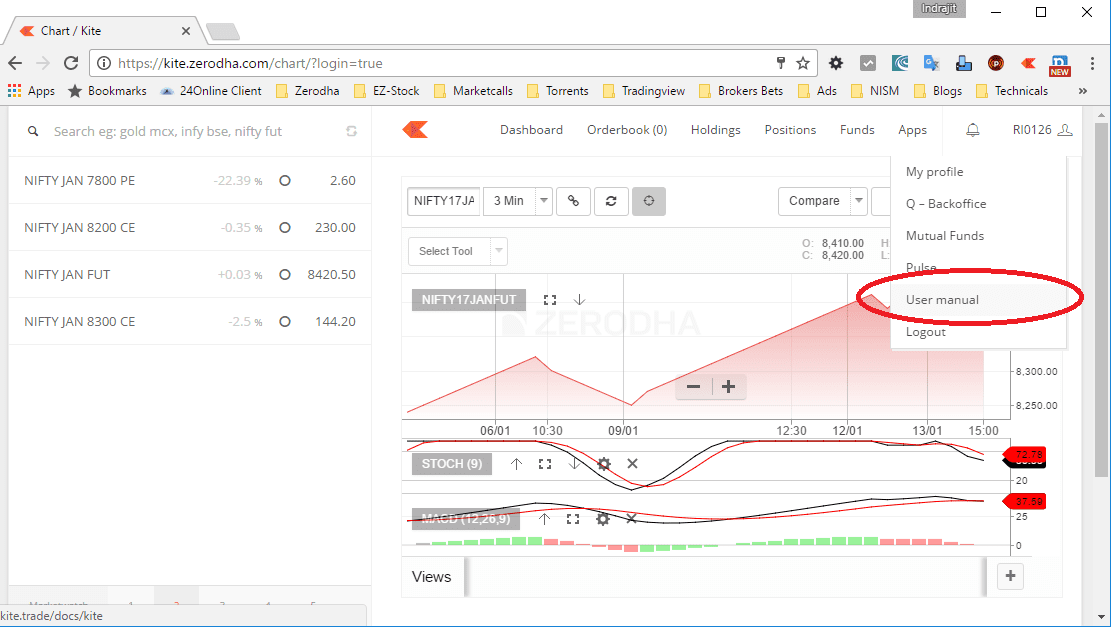
See the image below. Open kite, log in and then click on your user name on the extreme right top corner of the Kite screen. Once you click there you can see the user manual link. Click on it and the user manual will open in a new tab or window.
C. Brief Overview of the Blog Post
In this blog post, we will take a deep dive into the Zerodha Kite user manual. We will cover the account creation process, the login process, the dashboard overview, placing orders, portfolio management, and charting and analysis. We will also answer some frequently asked questions and provide a conclusion highlighting the significance of Zerodha Kite for traders and investors.
II. Zerodha Kite User Manual
A. Account Creation
To start using Zerodha Kite, you need to have a Zerodha trading and demat account. If you don’t have one, you can follow the Zerodha account opening process. Once you have the account, you can log in to Zerodha Kite using your credentials.





B. Login Process
The login process for Zerodha Kite is straightforward. You need to enter your Zerodha login ID and password, and you’re in. Alternatively, you can also use your Google or Facebook account to log in.
C. Dashboard Overview
The dashboard is the main screen of the Zerodha Kite platform. It provides a summary of your portfolio, market watchlist, order book, and trade book. You can customize the dashboard to suit your preferences by adding or removing widgets.
D. Placing Orders
Equity Orders
Equity orders are used to buy or sell stocks in the stock market. You can place an equity order by selecting the stock from the market watchlist and clicking on the buy or sell button. You can also place an equity order by entering the stock’s symbol and selecting the exchange and segment.
F&O Orders
F&O orders are used to trade in derivatives like futures and options. You can place an F&O order by selecting the contract from the market watchlist and clicking on the buy or sell button. You can also place an F&O order by entering the contract’s symbol and selecting the exchange and segment. In creating an FO order you must check the premium or discount of the contract with the underlying security.
Commodity Orders
Commodity orders are used to trade in commodities like gold and silver. You can place a commodity order by selecting the commodity from the market watchlist and clicking on the buy or sell button. You can also place a commodity order by entering the commodity’s symbol and selecting the exchange and segment.
Currency Orders
Currency orders are used to trade in currencies like USDINR and EURINR. You can place a currency order by selecting the currency from the market watchlist and clicking on the buy or sell button. You can also place a currency order by entering the currency’s symbol and selecting the exchange and segment.
E. Portfolio Management
The portfolio tab provides an overview of your holdings, including the stocks, F&O contracts, commodities, and currencies you have bought or sold. You can also view your realized and unrealized profits/losses, as well as your margin requirements.
F. Charting and Analysis
Zerodha Kite offers a wide range of charting and technical analysis tools to help traders and investors make informed decisions. Therefore, you can access various technical indicators, chart types, and drawing tools to analyze price movements and identify trends.
G. Frequently Asked Questions
Yes, Zerodha Kite is free to use for all Zerodha account holders.
No, you can only place regular orders during market hours, which are from 9:15 am to 3:30 pm on weekdays. However, there is an After Market Order option available for placing orders outside market hours.
No, Zerodha Kite is a self-service platform, and it does not provide research or advisory services.
H. Conclusion
Zerodha Kite is an innovative and user-friendly trading platform that has transformed the way investors trade in the stock market. The Zerodha Kite user manual provides a detailed guide on how to use the platform, from account creation to charting and analysis. By following the instructions provided in this user manual, you can trade and invest like a pro on Zerodha Kite. So, what are you waiting for? Open a Zerodha account today and start trading on Zerodha Kite!



How much time/days take to open an Account in Zerodha. that is one can start trading.
If everything is OK with your documents it generally takes 3 working days after your courier reaches the Zerodha head office. If there is some issue with your form or documents it can take longer. For EKYC or account opening with Aadhar card, generally, you can start trading the next day.