
Are you an intraday trader OR a positional swing trader? Whatever kind of trader are you, it can’t be denied that you need good quality end of day data (EOD) for technical analysis. I have seen that especially intraday traders do not use or look to the EOD charts. But its a completely wrong approach. You can be an intraday trader, you can trade for 5 minutes OR 15 minutes time frame but for a bigger analysis, you must consult the EOD chart. The main reason for consulting the end of the day chart is that trends do not develop all of a sudden on intraday. Rather intraday charts follow the EOD trends. For my readers, I am introducing Quandl – a FREE utility for the AmiBroker end of day data.
What is AmiBroker?
Before we dive into EOD data, let’s first talk about AmiBroker itself. AmiBroker is a popular software tool used by traders and investors to analyze financial markets. With AmiBroker, you can backtest trading strategies, perform technical analysis, and even create your own custom indicators.
AmiBroker supports a wide range of data sources, including real-time and EOD data feeds from various stock exchanges around the world. In this guide, we’ll focus on getting EOD data for the National Stock Exchange (NSE) in India.
What is EOD Data?
EOD data, as the name suggests, is data that is collected at the end of each trading day. This includes information such as the opening and closing prices, high and low prices, and trading volume for each stock on the exchange. EOD data is useful for performing historical analysis and backtesting trading strategies.
FAQ Section
To get EOD data for AmiBroker, you can either use a paid data service, download data from the NSE website or use a third-party plugin. Paid data services offer the most convenient option while downloading from the NSE website is free but require more manual work. Using a third-party plugin is also an option if you prefer a more integrated solution.
To download NSE EOD data for AmiBroker, you can visit the NSE website and download the daily bhavcopy files in CSV format. Then, you can import the data into AmiBroker using the “Import ASCII” function. Alternatively, you can use a third-party plugin like AmiFeeder that provides NSE EOD data for free.
To get real-time data in AmiBroker, you can either use a data service that provides real-time data, such as Global Datafeeds or TrueData or use a third-party plugin like AmiFeeder. AmiFeeder provides real-time data for a fee, along with free NSE EOD data.
NSE EOD data is end of day data for stocks listed on the National Stock Exchange (NSE) in India. This data includes information such as the opening and closing prices, high and low prices, and the trading volume for each stock on the exchange. NSE EOD data is useful for performing technical analysis and backtesting trading strategies.
How to Get AmiBroker End of Day Data?
Now that we understand what EOD data is and why it’s important, let’s talk about how to get it for AmiBroker. There are a few different ways to do this, depending on your preferences and budget.
Use a Paid Data Service
One of the easiest ways to get EOD data for AmiBroker is to use a paid data service. There are several companies that offer NSE EOD data subscriptions, such as Global Datafeeds, TrueData, and EODData. These services typically provide daily updates for all NSE stocks, along with various technical indicators and charting tools.






Download End of Day Data for AmiBroker from NSE Website
If you’re looking for a free option, you can download NSE EOD data directly from the NSE website. The NSE provides daily bhavcopy files, which contain EOD data for all NSE stocks. You can download these files in CSV format and import them into AmiBroker.
To download NSE EOD data from the NSE website, follow these steps:
- Go to the NSE website and click on “Archives” in the top menu
- Select “Equities” and choose the date range you want to download
- Click on “Download” to get the bhavcopy file in CSV format
- Open AmiBroker and go to “File” > “Import ASCII”
- Select the CSV file you downloaded and follow the prompts to import the data into AmiBroker
Use a Third-Party Plugin
Another option is to use a third-party plugin that integrates with AmiBroker and provides EOD data. One such plugin is AmiFeeder, which is a real-time data plugin that also provides EOD data. AmiFeeder offers NSE EOD data for free, along with real-time data for a fee.
To use AmiFeeder with AmiBroker, you’ll need to download and install the plugin, and then configure it to connect to the NSE servers. Once set up, you can access EOD data by selecting the appropriate database in AmiBroker.
I will now discuss about Quandl, another free third-party plugin to download bonuses and split-adjusted EOD data for AmiBroker.
Where to Download the Quandl Data Utility?
Download Quandl plugin versions for AmiBroker from here.
Once you download the Quandl plugin for AmiBroker just run the version suitable for your AmiBroker and install the plugin in your system. The installation will place the Quandl data plugin dll in your AmiBroker’s plugin folder.
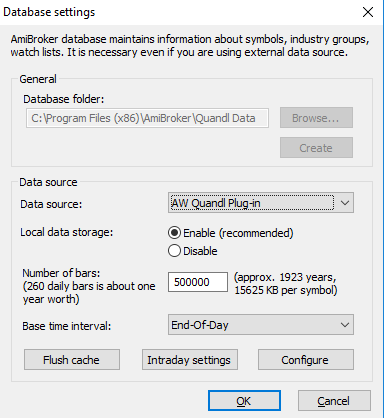
How To Create A Database For AmiBroker End Of Day Data With Quandl Data Plugin For AmiBroker?
Create a blank database using Quandl Plugin as the data source and click OK. This will create the Quandl database in your AmiBroker.
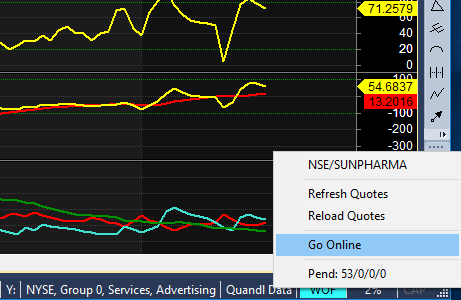
Now add your symbols. For NSE I suggest using the NSE database of Quandl. The link to the database is HERE. So you can add scrips and download data by taking the Quandl plugin online, Check the image below.
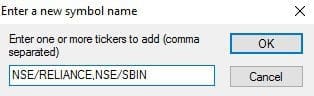
The general format for adding scrips in the Quandl database in AmiBroker is “NSE/SCRIPNAME”. So the script name for Reliance Industries will be NSE/RELIANCE. Add your scrips:
Once you add symbols check whether your plugin is online. Now you can open charts of different scrips one by one and the data will be updated. You can update this AmiBroker end of day data every night OR the next morning. I have uploaded my split-adjusted AmiBroker NSE database for you. You can download my AmiBroker database by clicking this link.
Latest Update on End of Day Data for AmiBroker with Quandl
When I am updating this post on the 9th of March, 2023, the Quandl company does not exist anymore. They have changed their name to Nasdaq Data Link. You can visit their website and create an account there.
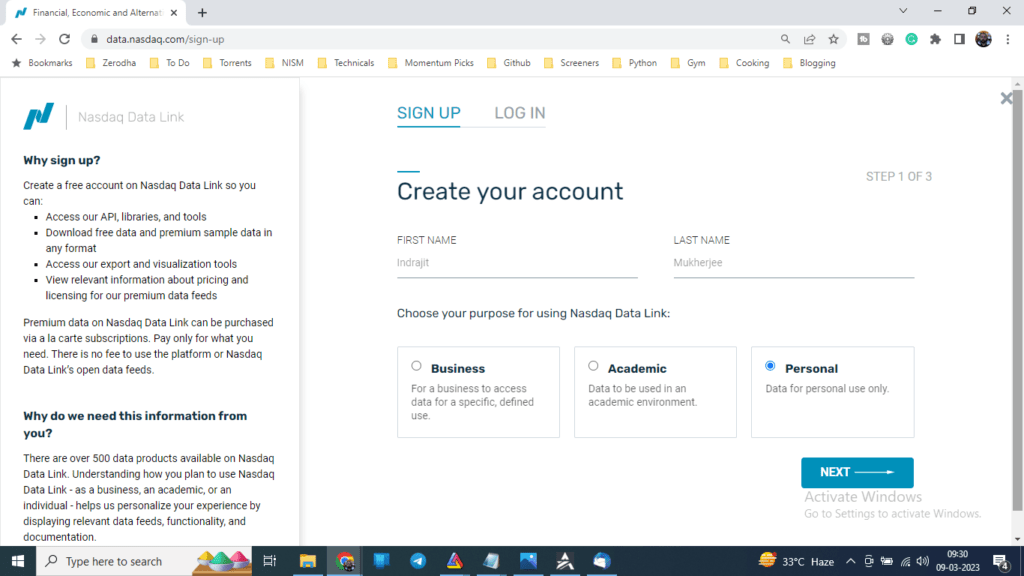
But I have seen they are now supporting API, R, Python, Excel, and Ruby. I have seen AmiBroker on their trading platforms page. But found no documentation on how to use the AmiBroker end of day data from their new website. I have also not got any plugin, which was available earlier. However, I have decided to mail them to get more info on it and I will try to update my readers on the same.
Conclusion
In conclusion, getting EOD data for AmiBroker is an essential step for any trader or investor looking to analyze the Indian stock market. Whether you choose to use a paid data service, download data from the NSE website, or use a third-party plugin, there are plenty of options available. By following the steps outlined in this guide, you’ll be well on your way to using AmiBroker to analyze your favorite stocks and make informed trading decisions.



sir, unable to get data for nifty and banknifty, can you please tell what symbol name should be used?
Vivek, use NSE/NIFTY_50 and NSE/NIFTY_BANK for Nifty index and Bank Nifty index respectively.
Hi,
I have downloaded the Utility even plugin showing green, but it is not downloading the data.
Please help.
Thanks,
Rajesh
Rajesh, try with my database and let me know, I have given the download link below of the post.
I have downloaded your database, that i can see, but that is till Feb.2017…. not updating that too.
Thanks,
no data after 4th jan 2019 why any idea ?
Yes its true no Data After 4th Jan 2019
NO DATA after 4th jan 2019? please help
I am sorry Chandrakant, but Quandl has stopped the support for NSE after that time.